Domain 2 · 18% of scored content
Tool Design & MCP Integration
The smallest domain by weight and the one with the highest ratio of cheap fixes to hard problems. Most tool-selection failures are description failures, most error-handling failures are shape failures, and most misuse failures are distribution failures. The recurring lesson is that the model is reading what you wrote — so write more.
 Open full size
 Design effective tool interfaces with clear descriptions and boundaries
Tool descriptions are the primary mechanism the model uses to pick a tool. When get_customer says "Retrieves customer information" and lookup_order says "Retrieves order details", and both accept similar identifier formats, misrouting is not a model defect — it is the only outcome the descriptions support.
A good description carries input formats, example queries, edge cases, and an explicit boundary against the tools it could be confused with. Expanding descriptions is the low-effort, high-leverage first move; few-shot examples add token overhead without touching the root cause, and a routing layer throws away the language understanding you are paying for.
Where overlap is genuine rather than merely underdescribed, rename and re-scope. analyze_content and analyze_document with near-identical descriptions is a naming problem: make one extract_web_results with a web-specific description. And a generic analyze_document is often three tools wearing a coat — extract_data_points, summarize_content, verify_claim_against_source, each with a defined contract.
One more place to look: the system prompt. Keyword-sensitive instructions there can create tool associations that override a well-written description.
Know
- Tool descriptions are the primary selection mechanism; minimal descriptions make selection unreliable
- Descriptions should include input formats, example queries, edge cases and boundary explanations
- Ambiguous or overlapping descriptions cause misrouting between similar tools
- System prompt wording is keyword-sensitive and can create unintended tool associations
Be able to
- Write descriptions that differentiate purpose, expected inputs, outputs, and when to use this tool versus a similar one
- Rename tools and rewrite descriptions to eliminate functional overlap
- Split generic tools into purpose-specific tools with defined input/output contracts
- Review system prompts for keyword-sensitive instructions that might override tool descriptions
Anti-patterns
- Adding few-shot examples as the first response to a selection problem caused by thin descriptions
- Building a keyword-matching routing layer in front of the model
- Consolidating two tools into one generic tool when the real problem was that neither was described
Implement structured error responses for MCP tools
MCP communicates failure with the isError flag, but the flag alone tells the agent almost nothing. A uniform "Operation failed" leaves it unable to choose between retrying, rephrasing, explaining to the user, or escalating — so it guesses.
Categorise. Transient errors (timeouts, service unavailability) may resolve on retry. Validation errors mean the input was wrong. Business errors mean policy forbade it. Permission errors mean the caller cannot do this at all. Return errorCategory, an isRetryable boolean, and a human-readable description, and the agent's next move becomes derivable rather than guessed.
For business rule violations, add retriable: false and a customer-friendly explanation so the agent can communicate the outcome instead of hammering the tool. Inside a subagent, recover from transient failures locally and propagate only what you could not resolve — along with partial results and what was attempted.
Keep one distinction sharp: an access failure is not an empty result. A search that timed out and a search that succeeded and found nothing require opposite responses.
Know
- The MCP isError flag communicates failure; structure communicates what to do about it
- Four categories: transient, validation, business, permission
- Uniform error responses prevent appropriate recovery decisions
- Retryable versus non-retryable metadata prevents wasted retry attempts
Be able to
- Return errorCategory, isRetryable and a human-readable description on every failure
- Add retriable: false plus a customer-friendly explanation for business rule violations
- Recover from transient failures locally inside subagents; propagate only unresolved errors, with partial results and what was attempted
- Distinguish access failures from valid empty results
Anti-patterns
- Returning a generic failure string and expecting the agent to infer the category
- Marking a timeout as a successful empty result, which hides the failure entirely
- Retrying business rule violations because nothing said they were terminal
Distribute tools appropriately across agents and configure tool choice
Tool selection reliability degrades as the tool count rises. Eighteen tools where four or five would do is not flexibility, it is decision complexity, and the model pays for it in misrouting. Give each agent the tools its role needs and nothing else — a synthesis agent with web search tools will eventually run a web search.
Where a cross-role need is high-frequency, scope a narrow tool rather than opening the whole set. If 85% of the synthesis agent's verification needs are simple fact-checks, give it verify_fact and keep the complex 15% routing through the coordinator. That is least privilege applied to tools. Similarly, replace an open fetch_url with a load_document that validates document URLs.
tool_choice controls whether and which. "auto" lets the model return text instead of calling anything. "any" forces a tool call but leaves the choice open. Forced selection — {"type": "tool", "name": "extract_metadata"} — pins a specific tool, which is how you guarantee metadata extraction runs before enrichment; the subsequent steps happen in follow-up turns.
Know
- Too many tools degrades selection reliability by increasing decision complexity
- Agents with tools outside their specialisation tend to misuse them
- Scoped access: role-appropriate tools, plus limited cross-role tools for specific high-frequency needs
- tool_choice options: "auto", "any", and forced selection by name
Be able to
- Restrict each subagent's tool set to its role
- Replace generic tools with constrained alternatives that validate their inputs
- Provide narrow cross-role tools for high-frequency needs and route complex cases through the coordinator
- Force a specific tool first with tool_choice when ordering matters, and set "any" to guarantee a tool call rather than conversational text
Anti-patterns
- Over-provisioning an agent "just in case", which violates separation of concerns
- Batching a subagent's needs to the coordinator when later steps depend on earlier answers
- Speculative caching of context in anticipation of what another agent might ask
Integrate MCP servers into Claude Code and agent workflows
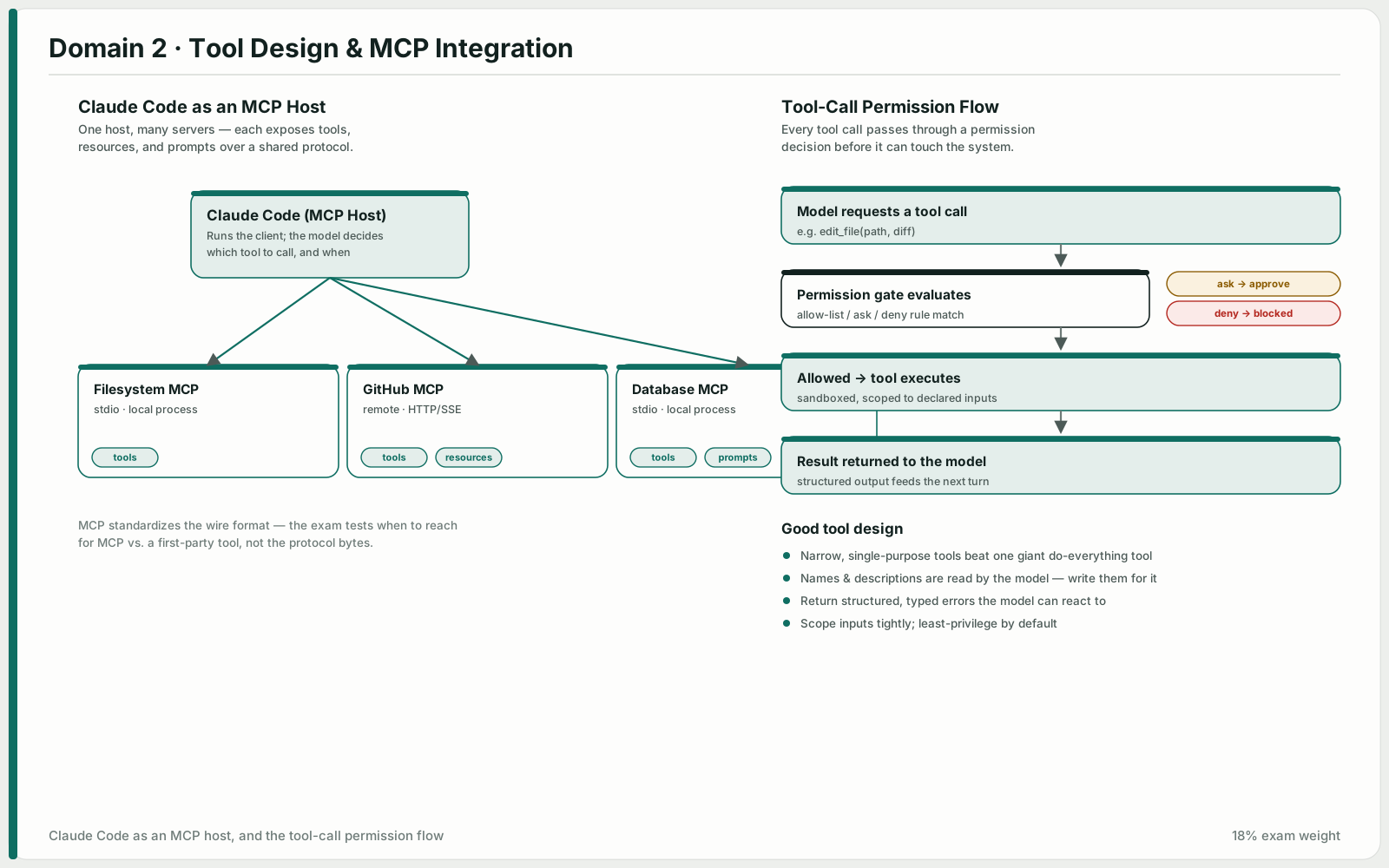
Scope decides who gets the server. Project-level .mcp.json is committed and shared with the team; user-level ~/.claude.json is personal and experimental. Credentials go in through environment variable expansion — ${GITHUB_TOKEN} in .mcp.json — so the config is committable and the secret is not.
Tools from every configured server are discovered at connection time and are all available to the agent simultaneously. That makes description quality matter more, not less: an MCP tool with a thin description loses to a built-in like Grep even when it is more capable. Say what it does and what it returns.
MCP resources are the underused half of the protocol. Exposing a content catalogue — issue summaries, documentation hierarchies, database schemas — gives the agent visibility into what exists without a round of exploratory tool calls to find out.
For standard integrations like Jira, prefer an existing community server. Reserve custom servers for workflows that are actually specific to your team.
Know
- Project scope (.mcp.json) for shared team tooling versus user scope (~/.claude.json) for personal servers
- Environment variable expansion in .mcp.json keeps credentials out of version control
- Tools from all configured servers are discovered at connection time and available simultaneously
- MCP resources expose content catalogues that reduce exploratory tool calls
Be able to
- Configure shared servers in project-scoped .mcp.json with ${VAR} expansion for tokens
- Keep personal and experimental servers in user-scoped ~/.claude.json
- Write MCP tool descriptions detailed enough that the agent prefers them to built-ins where appropriate
- Choose community servers for standard integrations; build custom ones for team-specific workflows
Anti-patterns
- Committing a token instead of a ${VAR} reference
- Putting a team-wide server in user scope, so teammates silently do not have it
- Writing a one-line description for a capable MCP tool and losing to Grep
Select and apply built-in tools effectively
Grep searches file contents — function names, error messages, import statements. Glob matches file paths — **/*.test.tsx and similar. Read and Write are whole-file operations; Edit makes targeted modifications by matching unique text. When Edit cannot find a unique anchor, Read the file and Write it back rather than fighting the match.
The exam's real interest is exploration strategy. Understanding a codebase is incremental: Grep to find entry points, Read to follow imports and trace flows. Reading every file up front burns context on material you will not need and leaves none for the part you do.
Tracing usage across wrapper modules has a shape worth remembering: identify all exported names first, then search for each name across the codebase. Searching for the original symbol alone misses everything that re-exports it.
Know
- Grep for content search, Glob for file path patterns
- Read/Write for full file operations, Edit for targeted change via unique text matching
- Read + Write is the fallback when Edit's anchor text is not unique
Be able to
- Use Grep to find callers of a function or locate error messages across a codebase
- Use Glob to find files by naming pattern regardless of directory
- Build understanding incrementally — Grep for entry points, then Read to follow imports and trace flows
- Trace usage through wrappers by listing exported names first, then searching for each
Anti-patterns
- Reading all files up front to "get context" before knowing what matters
- Reaching for Glob when the question is about file contents, or Grep when it is about filenames
- Retrying Edit against ambiguous anchor text instead of switching to Read + Write