Domain 3 · 20% of scored content
Claude Code Configuration & Workflows
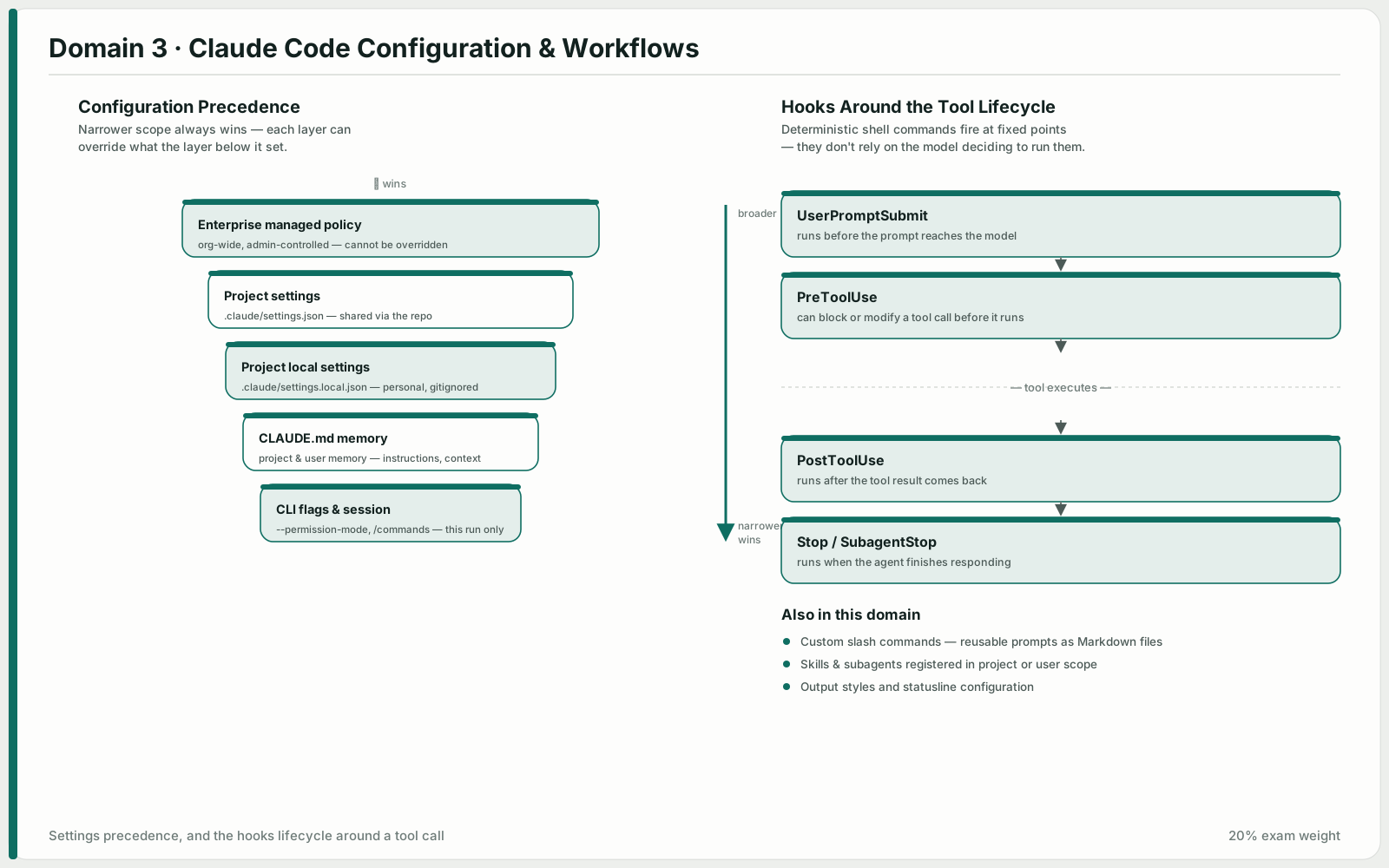
Configuration questions have unusually crisp answers: a file goes in exactly one place, and the wrong place has a specific observable symptom. Learn the hierarchy — user, project, directory — and the distinction between always-loaded context (CLAUDE.md), conditionally-loaded context (.claude/rules/ with path globs), and on-demand context (skills). The workflow half of the domain is about matching effort to task: plan mode, direct execution, and how to iterate when the first attempt is wrong.
 Open full size
 Configure CLAUDE.md files with appropriate hierarchy, scoping, and modular organization
Three levels. User-level ~/.claude/CLAUDE.md applies to you alone and is not shared through version control. Project-level — .claude/CLAUDE.md or a root CLAUDE.md — travels with the repository and reaches everyone who clones it. Directory-level CLAUDE.md files apply within their subtree.
That hierarchy explains the classic bug report: a new team member does not get the conventions everyone else seems to have. The instructions were in someone's user-level file, which was never in the repo at all.
Keep large configurations modular. @import references external files so each package's CLAUDE.md pulls in only the standards its maintainers care about. Alternatively, split a monolith into .claude/rules/ topic files — testing.md, api-conventions.md, deployment.md — which reads better and is easier to review.
When behaviour differs between sessions and you cannot see why, /memory shows which memory files are actually loaded.
Know
- The hierarchy: user (~/.claude/CLAUDE.md), project (.claude/CLAUDE.md or root CLAUDE.md), directory (subdirectory files)
- User-level settings are not shared with teammates through version control
- @import keeps CLAUDE.md modular by referencing external standards files
- .claude/rules/ organises topic-specific rules as an alternative to one monolithic file
Be able to
- Diagnose hierarchy problems by asking which level a missing instruction lives at
- Use @import to include only the standards each package needs
- Split a large CLAUDE.md into focused topic files under .claude/rules/
- Run /memory to verify which memory files are loaded when behaviour is inconsistent
Anti-patterns
- Putting team conventions in ~/.claude/CLAUDE.md and assuming everyone has them
- Growing one CLAUDE.md until nobody reads it and every session loads all of it
- Guessing at loaded configuration instead of checking with /memory
Create and configure custom slash commands and skills
A command in .claude/commands/ is version-controlled and available to everyone who pulls the repository. The same command in ~/.claude/commands/ is yours alone. If the requirement contains the words "every developer", the answer is the project directory.
Skills live in .claude/skills/ as SKILL.md files with frontmatter. Three options matter on the exam. context: fork runs the skill in an isolated sub-agent context, so a verbose codebase analysis or an exploratory brainstorm does not pollute the main conversation. allowed-tools restricts what the skill can do while it runs — limiting it to file writes, for instance, so it cannot take destructive action. argument-hint prompts the developer for parameters when they invoke the skill bare.
To customise a shared skill for yourself, create a variant in ~/.claude/skills/ under a different name rather than editing the team's copy.
The choice between a skill and CLAUDE.md is about loading: CLAUDE.md is always-loaded universal standards, a skill is on-demand invocation for a task-specific workflow.
Know
- Project-scoped commands in .claude/commands/ are shared; user-scoped in ~/.claude/commands/ are personal
- SKILL.md frontmatter supports context: fork, allowed-tools and argument-hint
- context: fork isolates the skill's output from the main conversation
- Personal variants belong in ~/.claude/skills/ under a different name
Be able to
- Create team-wide slash commands in .claude/commands/ so they arrive with a clone or pull
- Use context: fork for skills that produce verbose or exploratory output
- Configure allowed-tools to restrict tool access during skill execution
- Use argument-hint to prompt for required parameters
- Choose skills for on-demand task workflows and CLAUDE.md for always-on standards
Anti-patterns
- Putting a shared command in ~/.claude/commands/ and telling the team to copy it
- Expecting a skill to apply automatically when the requirement is deterministic per-file behaviour
- Editing a shared skill in place to suit one person
Apply path-specific rules for conditional convention loading
Files under .claude/rules/ can carry a YAML frontmatter paths field with glob patterns. The rule loads only when the file being edited matches. That does two things: it keeps irrelevant conventions out of context, and it makes the association deterministic rather than inferential.
The case that decides this objective is conventions for files spread across the tree. Test files sit next to the code they test — Button.test.tsx beside Button.tsx — so a directory-level CLAUDE.md cannot catch them; you would need one in every directory. A rule with paths: ["**/*.test.tsx"] catches all of them wherever they live.
Compare the alternatives honestly. A consolidated root CLAUDE.md with headers relies on the model inferring which section applies. Skills need to be invoked or chosen. Only path-scoped rules give you automatic application keyed on the file path.
Know
- .claude/rules/ files use YAML frontmatter paths globs for conditional activation
- Path-scoped rules load only when editing matching files, reducing irrelevant context and tokens
- Glob patterns beat directory-level CLAUDE.md when conventions span multiple directories
Be able to
- Scope rules with frontmatter such as paths: ["terraform/**/*"] or paths: ["src/api/**/*"]
- Use type-based globs like **/*.test.tsx to apply conventions regardless of directory
- Prefer path-specific rules to subdirectory CLAUDE.md files when files are spread across the codebase
Anti-patterns
- Relying on the model to pick the right section of a consolidated CLAUDE.md
- Scattering CLAUDE.md files into every directory that happens to contain a test
- Using skills where the requirement says conventions must apply automatically
Determine when to use plan mode vs direct execution
Plan mode is for large-scale change, multiple valid approaches, architectural decisions and multi-file work. It buys safe exploration and design before you commit to anything, which is what prevents expensive rework when a dependency surfaces late.
Direct execution is for well-scoped, well-understood change: a single-file bug fix with a clear stack trace, adding a date validation conditional. Planning those is ceremony.
Read the question for whether complexity is already stated. "Restructure the monolith into microservices, dozens of files, decisions about service boundaries" is not complexity that might emerge — it is complexity in the requirements, so starting direct and switching later is the wrong answer.
The two combine well: plan the library migration, then execute the planned approach directly. And during a plan's discovery phase, the Explore subagent isolates verbose output and returns a summary, which is how a multi-phase task avoids exhausting its context window.
Know
- Plan mode suits large-scale changes, multiple valid approaches, architectural decisions and multi-file modifications
- Direct execution suits simple, well-scoped changes
- Plan mode enables safe exploration and design before committing, preventing costly rework
- The Explore subagent isolates verbose discovery and returns summaries
Be able to
- Choose plan mode for architectural work — restructuring, migrations affecting dozens of files, choosing between integration approaches
- Choose direct execution for a single-file fix with a clear cause
- Use Explore for verbose discovery phases to protect the context window
- Combine the two: plan the investigation, then execute directly
Anti-patterns
- Starting direct and planning to switch when complexity appears, on a task whose complexity is already stated
- Writing comprehensive upfront instructions for a structure you have not explored yet
- Letting implementation "reveal" boundaries when discovering them late means rework
Apply iterative refinement techniques for progressive improvement
When prose keeps being interpreted differently, stop writing prose. Two or three concrete input/output examples communicate a transformation better than any paragraph, because they leave nothing to interpret.
Test-driven iteration is the same idea with a feedback loop attached: write the suite first — expected behaviour, edge cases, performance requirements — then iterate by sharing the failures. Each round is grounded in something observable.
The interview pattern is for unfamiliar domains. Have Claude ask you questions before implementing, and it surfaces the considerations you had not thought of — cache invalidation strategy, failure modes — while changing them is still cheap.
One decision worth getting right: when several problems interact, put them all in one detailed message so the fixes are designed together. When they are independent, fix them sequentially.
Know
- Concrete input/output examples communicate transformations that prose describes inconsistently
- Test-driven iteration: write the suite first, then iterate by sharing failures
- The interview pattern surfaces considerations before implementation
- Interacting problems go in one message; independent problems go sequentially
Be able to
- Provide 2–3 concrete input/output examples when natural language keeps producing inconsistent results
- Write tests covering behaviour, edge cases and performance before implementation, then iterate on failures
- Use the interview pattern in unfamiliar domains before writing code
- Give specific failing cases with expected output to fix edge case handling, such as nulls in a migration script
Anti-patterns
- Rewriting the description a third time instead of showing an example
- Fixing interacting issues one at a time and watching each fix break the last
- Implementing first in an unfamiliar domain and discovering the design questions afterwards
Integrate Claude Code into CI/CD pipelines
The -p (or --print) flag runs Claude Code non-interactively: it processes the prompt, writes the result to stdout and exits. Without it, a pipeline job waits for interactive input and hangs. This is the documented mechanism — there is no CLAUDE_HEADLESS variable and no --batch flag.
For machine-readable output, --output-format json with --json-schema produces structured findings you can post as inline PR comments without parsing prose.
CLAUDE.md is how CI-invoked Claude Code learns your project: testing standards, fixture conventions, review criteria. Documenting what makes a test valuable and which fixtures exist is the difference between generated tests worth merging and generated noise. Passing existing test files in context stops it from proposing scenarios you already cover.
On re-runs after new commits, include the prior findings and instruct it to report only new or still-unaddressed issues — otherwise every run re-posts the same comments. And remember that the session that wrote the code is not the best reviewer of it: an independent instance without the generator's reasoning context catches more.
Know
- -p / --print runs Claude Code non-interactively in automated pipelines
- --output-format json and --json-schema enforce structured output in CI
- CLAUDE.md supplies project context — testing standards, fixture conventions, review criteria
- A session that generated code is less effective at reviewing its own changes than an independent instance
Be able to
- Run with -p in CI to prevent interactive input hangs
- Use --output-format json with --json-schema to produce parseable findings for inline PR comments
- Include prior review findings on re-runs and ask only for new or unaddressed issues
- Provide existing test files so generation avoids duplicating covered scenarios
- Document testing standards and available fixtures in CLAUDE.md
Anti-patterns
- Reaching for environment variables or stdin redirection when a documented flag exists
- Re-posting the same review comments on every commit
- Letting the generating session review its own output